
Multi-WAN Load Balancer
Gateway.
8-WAN, 10 Gbps with Hotspot Prevention.
Built for 15,000 concurrent devices. Engineered for staff accommodation, university residences, and industrial zones across UAE & GCC.
FlowCue FC-8410 — 8× WAN in, 1× bonded link out. Session-based load balancing.
When 15,000 Devices Share One Network — FlowCue Keeps it Fair
Staff accommodation operators and large venue managers across the UAE know the problem: thousands of residents sharing a limited bandwidth pool — some users consuming all of it while others get nothing. FlowCue was built to solve exactly this.
8-WAN Aggregate Load Balancing
FlowCue simultaneously manages up to 8 independent ISP connections using intelligent multi-WAN load balancing. Traffic is distributed across all active uplinks using weighted algorithms — maximising utilisation of every available WAN circuit.
Per-User Fairness & QoS Shaping
Without traffic fairness enforcement, a small number of heavy users will consume all available bandwidth. FlowCue solves this with Smart Queue Management and per-IP rate shaping that guarantees every connected user a fair share.
Hotspot Sharing Prevention
FlowCue includes NETCUE's proprietary hotspot-sharing detection and prevention system. Using connection count limiting, TTL/hop-count analysis, and per-IP concurrent session caps, FlowCue identifies and throttles devices proxying traffic.
Stateful Firewall
FlowCue's stateful firewall tracks the state of all active network connections — allowing only legitimate return traffic through while blocking unsolicited inbound connections, port scans, and network reconnaissance attempts.
10 Gbps Total Throughput
With 8 WAN ports each supporting up to 1 Gbps, FlowCue's aggregate throughput capacity reaches 10 Gbps. Internal switching fabric and the optimised datapath ensure line-rate performance without bottlenecks.
NexusCue Cloud Management
Every FlowCue appliance is registered to the NexusCue platform, giving complete remote visibility and control. Push firmware updates, modify WAN weights, adjust QoS policies, pull real-time traffic graphs, and receive automated alerts.
When Scale is the Challenge
Most network appliances are built for hundreds of users. FlowCue is built for tens of thousands. It is NETCUE Technology's purpose-engineered multi-WAN load balancer — designed and developed entirely by our in-house R&D team — specifically for the high-density, high-throughput requirements of staff accommodation complexes, university campuses, large hospitality sites, and industrial facilities across the UAE and GCC. Every hardware model can be customized to match your project or site requirements — from port density and form factor to throughput capacity and environmental hardening.
The challenge at 15,000-user scale is not just raw bandwidth — it is managing simultaneous connections fairly, preventing network abuse, ensuring every WAN link is fully utilized, and maintaining service continuity when an ISP drops. FlowCue solves all of this in a single appliance, pre-configured and ready to deploy.
- Hardware-accelerated forwarding on all models
- Intelligent multi-WAN engine with traffic distribution
- Managed via NexusCue cloud platform
- Compatible with any GCC ISP — not only Etisalat/e& and du (includes STC, Ooredoo, Batelco, Zain, Starlink, private fiber)
- Custom hardware configurations available per project requirement
Engineered for Extreme Scale
Multi-WAN Load Balancing & Failover
At 15,000 devices, a single ISP link is a single point of failure. FlowCue bonds up to 8 independent WAN connections into a single resilient, high-throughput pipe.
NETCUE Weighted Load Balancing
Distribute outbound sessions across all active WAN links using configurable weights. Prioritize higher-speed or lower-latency ISPs automatically. Run mixed-speed links — e.g., three 1Gbps fiber links and two 500Mbps cable lines — with intelligent weighting for aggregate throughput maximization.
Sub-Second WAN Failover
Continuous health monitoring via ICMP, TCP port checks, and HTTP probes on each WAN interface. When a link drops, traffic is redistributed to remaining links within milliseconds — users experience no disconnection, no VoIP drops, no streaming interruptions.
Policy-Based Traffic Routing
Define routing rules based on source IP, destination IP, port, DSCP mark, or VLAN. Send VoIP traffic through the lowest-latency WAN, route IPTV streams through dedicated links, and distribute general internet browsing across all remaining connections.
Per-WAN Link Monitoring
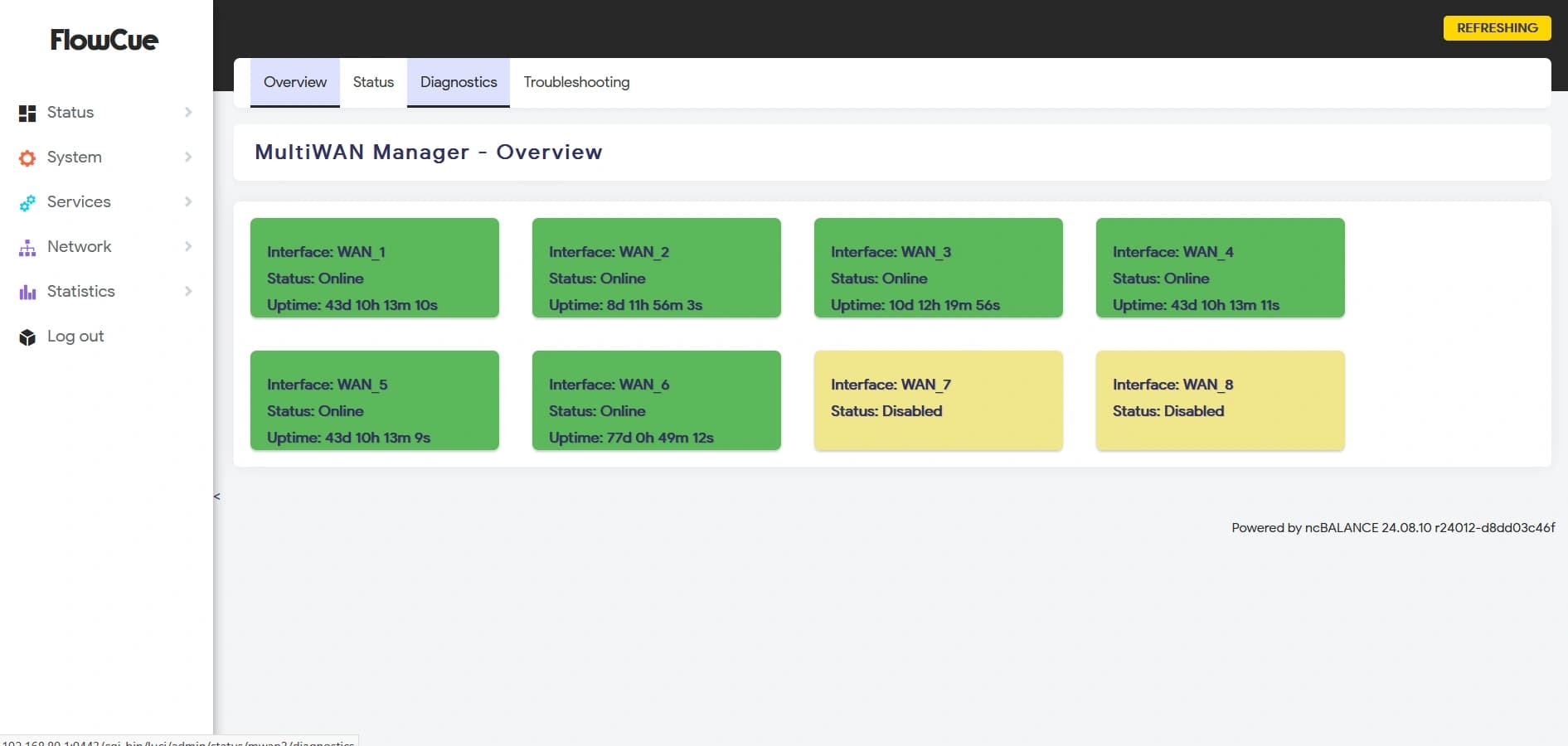
Real-time status, throughput, latency, and packet loss per WAN port. Historical graphs for ISP SLA verification and capacity planning. Alerting via email or webhook when any WAN link degrades or fails.
Stateful Firewall
Enterprise-grade connection tracking and access control — processing millions of concurrent sessions without packet loss or throughput degradation.
Stateful Connection Tracking
Full connection state table maintaining millions of concurrent TCP/UDP/ICMP sessions. Intelligent connection tracking ensures only legitimate, established-state traffic is forwarded — all unsolicited inbound traffic is silently dropped by default.
Access Control Lists (ACL)
Granular inbound and outbound firewall rules by source IP, destination IP, protocol, port range, MAC address, and VLAN. Rule ordering and priority management from the web UI — no command-line expertise required for daily operations.
QoS & Traffic Shaping
Per-IP and per-class quality of service rules ensure fair bandwidth distribution across all 15,000 devices. Guarantee minimum bandwidth for critical services — VoIP, management traffic, IPTV — while limiting peer-to-peer or bulk download traffic that could saturate links.
NAT & Port Forwarding
Full NAT with MASQUERADE, DNAT, and hairpin NAT support. Port forwarding rules for inbound services. NAT reflection for internal servers accessible via public IP. IPv4 and IPv6 dual-stack operation.
Hotspot Sharing Prevention
A critical requirement for staff accommodation and hospitality deployments — preventing individual users from reselling or sharing their purchased Wi-Fi access.
TTL / Hop Count Normalization
Detect and neutralize mobile hotspot tethering by normalizing IP TTL values at the gateway — making all downstream tethered devices appear as a single hop. Works against iOS, Android, and Windows hotspot sharing regardless of whether the user is on a paid or free tier.
Connection Limiting Per IP
Limit the maximum number of concurrent TCP/UDP connections per IP address. Users who attempt to share via SOCKS5 proxies, VPN apps, or dedicated hotspot hardware are rate-limited to the connection ceiling of a single device.
Device Fingerprinting & Detection
User-Agent analysis and TCP fingerprinting identify OS types of devices connecting behind a single IP. Alerting and automatic enforcement when unusual multi-OS traffic patterns indicate shared hotspot abuse.
Per-IP Fairness Queuing
Smart Queue Management with per-IP fairness queuing ensures that no single user or hotspot monopolizes uplink or downlink capacity. Buffer bloat elimination keeps latency low for all users even at 100% link utilization.
Web Management & Monitoring
Intuitive, browser-based management for day-to-day operations — no Linux command-line expertise required for standard configuration and monitoring tasks.
Real-Time Dashboard
Live overview of all WAN interfaces, current throughput, active sessions count, CPU and memory utilization, and system health status. At-a-glance awareness for NOC operations and on-site engineers.
NexusCue Cloud Integration
Register FlowCue appliances under your NexusCue tenant for centralized remote management, firmware updates, configuration backup, and multi-site monitoring from a single cloud dashboard — regardless of the appliance's physical location.
CLI & SSH Access
Shell and console access to the device for advanced configuration.
Alerting & Notifications
Email, webhook, and Slack alerts for WAN link failures, throughput threshold breaches, session table exhaustion, and hardware health events. Configurable alert thresholds and notification schedules.
FlowCue FC-8410 Specifications
The flagship FlowCue FC-8410 appliance — purpose-built for 15,000 concurrent user environments.
Connectivity
Performance
Hardware
Software & Protocols
Security
Management
Where FlowCue Excels
Staff Accommodation & Labour Camps
The primary use case FlowCue was designed for. UAE labour camps and staff accommodations with 15,000 residents demand a gateway that can handle massive concurrent connections, enforce per-person fairness, and prevent bandwidth abuse.
University Student Residences
Student hostels and on-campus residences face identical challenges. FlowCue provides per-room bandwidth allocation, RADIUS-authenticated access, and content policy enforcement at the gateway level.
Industrial Zones & Free Zones
Industrial compounds hosting hundreds of companies and thousands of workers need a robust shared internet gateway. FlowCue's WAN aggregation and per-tenant VLAN support make it ideal for multi-operator environments.
Remote Worker Camps & Oilfield Sites
Sites in remote areas where multiple satellite or LTE WAN links must be combined. FlowCue's WAN failover and load balancing maximises uptime in environments where connectivity redundancy is mission-critical.
Large Residential Compounds
Gated residential communities offering shared broadband to hundreds of villas or apartments. FlowCue enforces per-household bandwidth limits and prevents any single resident from degrading the shared service.
Events & Exhibition Venues
Temporary large-scale events requiring high-capacity internet for exhibitors and attendees. FlowCue's multi-WAN bonding and real-time traffic shaping handles burst-load scenarios typical of trade shows.
FlowCue + EdgeCue
The Complete Stack
The most powerful NETCUE deployments combine FlowCue's WAN aggregation layer with EdgeCue's security and captive portal intelligence — a proven architecture for 15,000-user sites across the UAE.
EdgeCue
Place EdgeCue behind FlowCue for per-user authentication, NGFW protection, IPS/IDS, and captive portal management on the LAN side.
Learn EdgeCueNexusCue
Manage FlowCue appliances remotely — firmware updates, configuration backup, monitoring, and alerts — through the NexusCue cloud portal.
Learn NexusCueAccessCue
Combined with EdgeCue and FlowCue, AccessCue provides the cloud RADIUS backend for subscriber authentication, session tracking, and data monetization.
Learn AccessCueManaging a High-Density Network in the UAE or GCC?
Our engineers have deployed FlowCue at sites across Dubai, Sharjah, Abu Dhabi, Oman, and Saudi Arabia. Tell us your site specs — number of users, WAN connections available, and current problems — and we'll design the right FlowCue deployment for you.